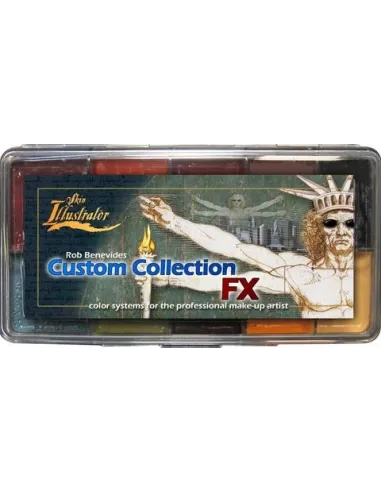
The Skin Illustrator NYU FX Palette is a 10-color alcohol-activated makeup palette designed by Rob Benevides, professor and makeup director at New York University's Tisch School of the Arts (NYU). It offers exceptional coverage and durability on skin, silicone and latex, making it a reference tool for special effects and professional character makeup.
Technical specifications
| Feature | Detail |
|---|
| Product type | Alcohol-activated makeup palette |
| Number of colors | 10 |
| Designed by | Rob Benevides (NYU Tisch School of the Arts) |
| Compatible surfaces | Skin, silicone, latex |
| Recommended activator | Skin Illustrator Activator / Skin Illustrator Slow Activator / isopropyl alcohol 99% |
| Removal | Telesis Super Solv / Telesis Makeup Remover |
| Durability | High (strong staying power once activated) |
What it is used for
The NYU FX Palette is designed for professional makeup artists and special effects artists who need precise, long-lasting results compatible with prosthetics and workshop materials. Its 10 colors allow you to blend shades, create shadows and highlights, and work on both real skin and finished silicone or latex pieces.
- Theater and film character makeup
- Painting silicone and latex prosthetics for special effects
- Wound, scar and aging makeup
- Full-body effects on skin
- High-durability body painting work
- Training and practice in professional FX makeup
- Color integration of prosthetic pieces with the actor's skin
How to use it
- Make sure the surface (skin, silicone or latex) is clean, dry and free of grease or residue.
- Pick up a small amount of color from the palette with a brush or sponge.
- Activate the pigment by moistening it with isopropyl alcohol 99%, Skin Illustrator Activator or Slow Activator depending on the working speed you need. Never use 70% alcohol, MEK, acetone or water.
- Apply in thin layers and allow each layer to set before adding the next. This improves coverage and durability.
- Blend colors directly on the palette or on the surface to achieve the desired shades.
- Once dry, the paint sets firmly and is resistant to sweat and normal handling.
- To remove the makeup, use Telesis Super Solv or Telesis Makeup Remover. Do not use water or aggressive solvents that may damage prosthetics or skin.
Usage tips
Choose the right activator for the situation
The standard Skin Illustrator Activator is ideal for fast on-set work. If you need more manipulation time to blend shades precisely, go for the Slow Activator. In the workshop, isopropyl alcohol 99% is an economical and effective alternative. Never use pharmacy-grade 70% alcohol: the water it contains prevents proper adhesion and can ruin your work.
Work in thin layers for better durability
A single thick layer of pigment tends to crack and peel with movement. Apply several thin layers, allowing the alcohol to evaporate between each one. This method gives you better coverage, richer tones and a much more durable bond, especially in areas of movement such as the neck, hands or around the mouth.
Painting on silicone: temperature and cleanliness are key
When painting silicone prosthetics, make sure the piece is fully cured and clean of any release agent residue. A light degreasing beforehand with isopropyl alcohol 99% noticeably improves color adhesion. Work at room temperature: excessive cold can slow the evaporation of the activator and hinder adhesion.
Frequently asked questions
What is used to activate these alcohol colors?
The NYU FX Palette is activated with Skin Illustrator Activator, Skin Illustrator Slow Activator or isopropyl alcohol 99%. It is essential that the alcohol has a minimum purity of 99%; pharmacy-grade 70% alcohol contains water and does not properly fix the pigments.
Can it be used on sensitive skin or delicate areas?
Skin Illustrator colors are formulated for professional use on skin. However, as with any cosmetic product, it is advisable to perform a patch test on a small area before extensive application, especially on people with very sensitive skin or a history of allergies to alcohol-activated makeups.
Is it suitable for painting silicone prosthetics?
Yes. The NYU FX Palette is fully compatible with silicone. This is one of its most common uses in special effects: painting silicone prosthetics and pieces to integrate them chromatically with the actor's skin. Clean the piece with alcohol before painting to remove release agent residue and improve adhesion.
How is this type of makeup removed?
Skin Illustrator alcohol makeup is removed with Telesis Super Solv or Telesis Makeup Remover. Do not use water, acetone or aggressive solvents, as they can damage prosthetics or irritate the skin. On silicone or latex surfaces, Telesis Super Solv is likewise the appropriate remover.
Can I mix colors from this palette with other Skin Illustrator palettes?
Yes. All colors in the Skin Illustrator range are compatible with each other and can be freely mixed. You can combine the NYU FX Palette with the Flesh Tone Palette, the Complexion Palette or the FX Palette to extend your color range.
How long does the makeup last once applied?
Once activated and dry, Skin Illustrator makeup shows high resistance to sweat, water and normal handling. Durability depends on the application area, number of layers and environmental conditions, but under normal filming or performance conditions it holds perfectly throughout a full working day.
What type of projects is the NYU FX Palette best suited for?
This palette was designed specifically for special effects: wounds, scars, aging, monsters, extreme character makeups and prosthetics painting. Its 10 colors are selected to cover the most common needs of the FX makeup artist, from flesh tones to pathology colors and complex gradients.
What is the difference between this palette and others in the same line?
The NYU FX Palette was created by Rob Benevides with a color selection aimed at special effects and academic FX makeup training. Other palettes in the line, such as the Flesh Tone or the Dark Fleshtone, are more focused on natural skin tones, while the FX Palette extends the range towards more extreme effect colors.