Shopping Cart



TATÚ FX - Veins Small
221200302
€15.00
18,15 € Tax incl.
18,15 € Tax incl.
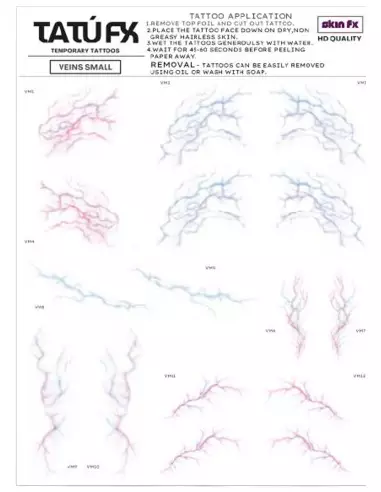
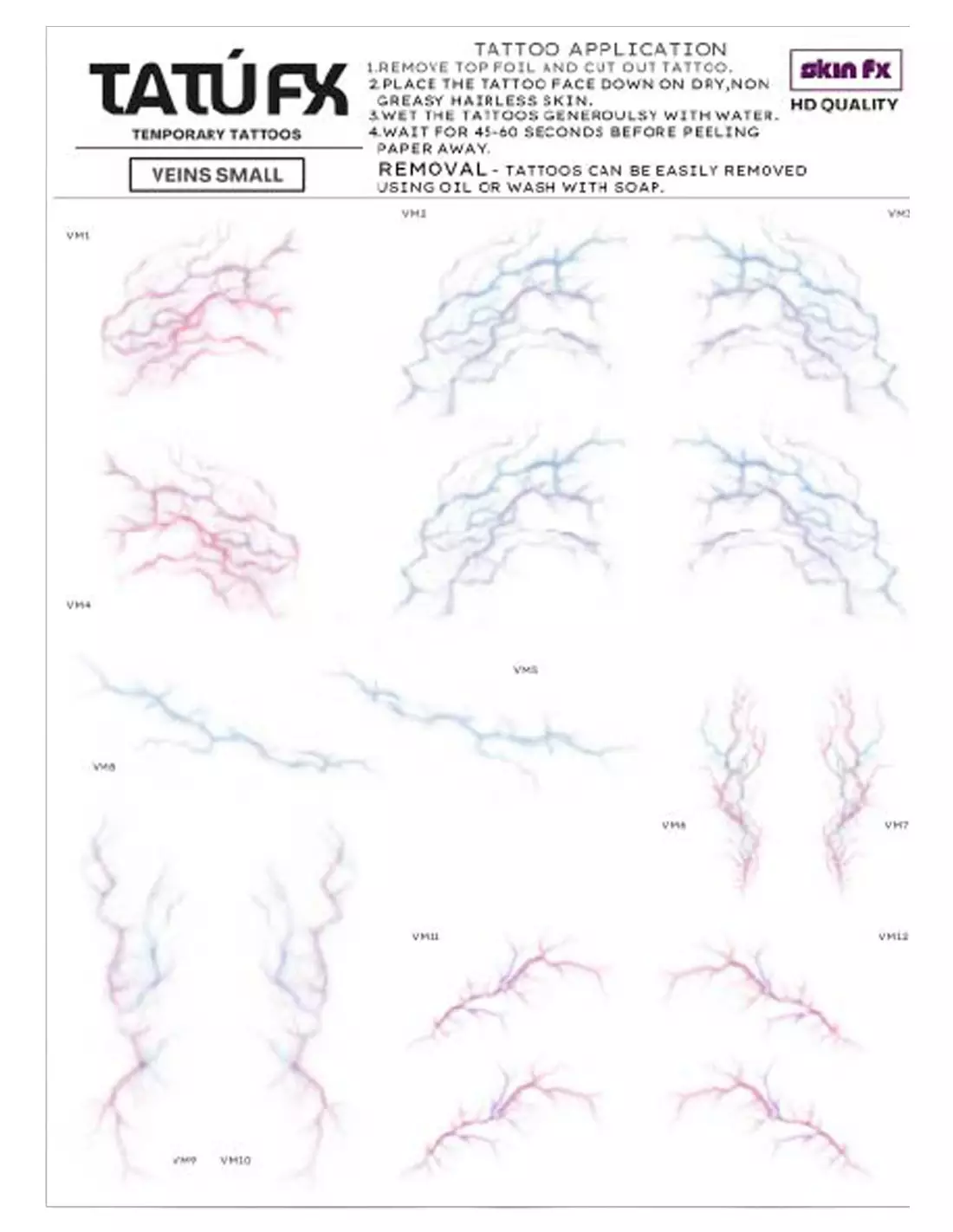
A5 sheet with 16 realistic temporary vein tattoos for SFX, theatre, film and cosplay. Ready to apply, designed by a professional makeup artist.
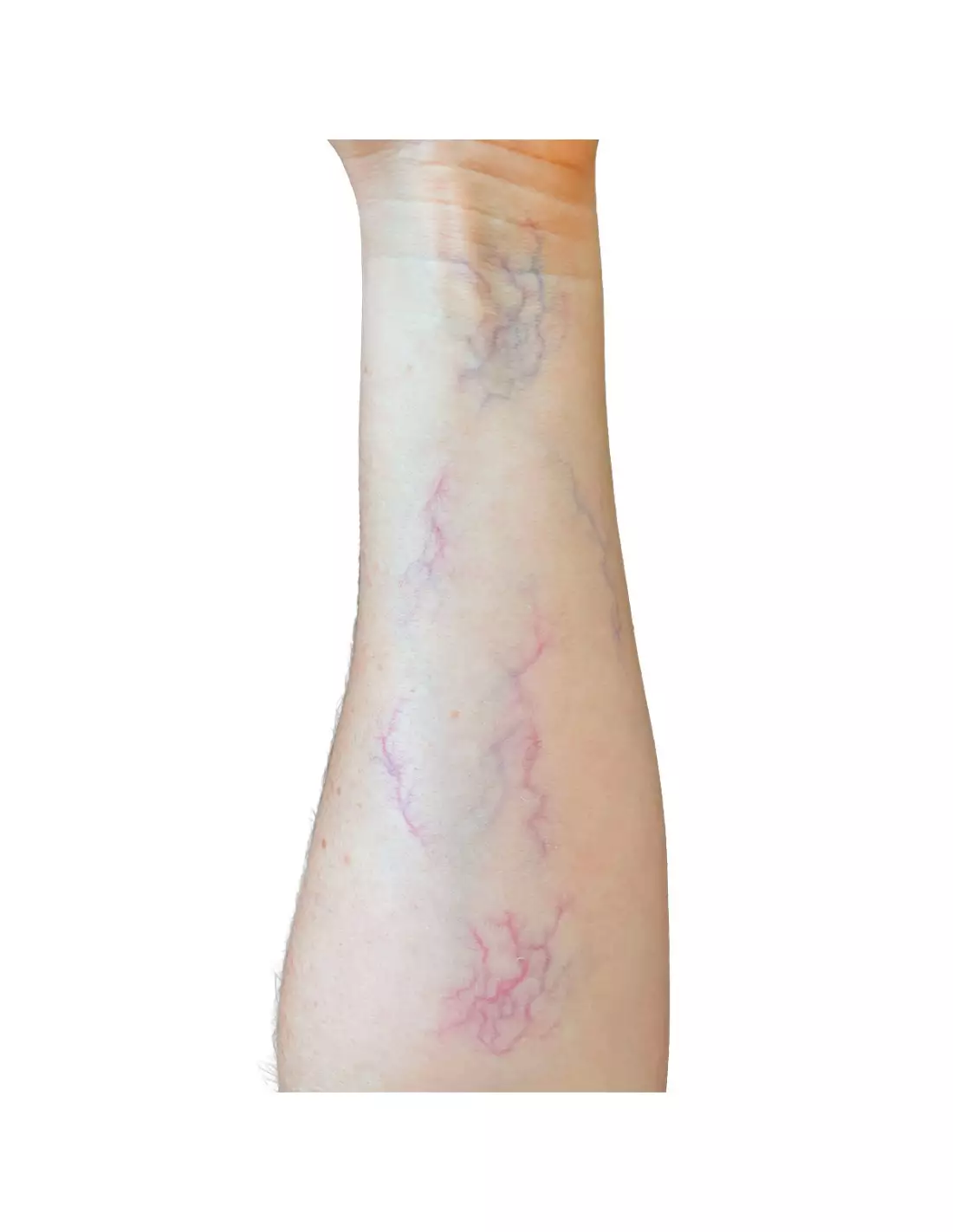
TATÚ FX Veins Small is an A5 sheet with 16 ready-to-apply temporary vein tattoos, designed by a professional makeup artist to achieve believable vascular effects without hand-painting. Different shapes and sizes on a single sheet allow you to compose anything from a subtle vein to a high-density vascular network. An essential addition to any SFX makeup kit that demands efficiency and professional results.
Technical specifications
| Format | A5 sheet |
|---|---|
| Contents | 16 vein tattoos with vascular effects |
| Variety | Different shapes and sizes on the same sheet |
| Product type | Temporary transfer tattoo |
| Design | Created by a professional makeup artist |
| Application orientation | Image is mirrored when transferred onto skin |
| Main uses | SFX, film, theatre, cosplay, medical simulation, photography |
What it's used for
This sheet is designed for any professional or semi-professional special effects makeup artist who needs to add vascular detail quickly and reproducibly. The natural finish blends seamlessly with skin without the artificial look that betrays hand-painted work under shooting or performance conditions.
- Character makeup: ageing, sickly or gaunt characters
- Wound effects, damaged or translucent skin
- Medical simulations and healthcare training
- Cosplay of creatures, undead, vampires or alien beings
- Film and TV shoots where preparation time is limited
- Theatre productions with quick character changes
- Fashion, dark editorial or horror photo shoots
- Halloween events and LARP
How to use it
- Thoroughly clean and dry the skin area where you will apply the transfer. Remove any traces of oil or moisturiser.
- Cut out the vein design you need from the A5 sheet. Bear in mind that the image will appear mirrored on the skin, so take orientation into account if it matters.
- Place the transfer printed side down onto the skin.
- Dampen the back of the paper with a wet sponge or cloth. Press firmly and hold for 20–30 seconds.
- Carefully peel off the paper starting from one corner. If the transfer hasn't fully adhered, dampen and press again.
- Allow to dry for a few seconds. You can then layer more designs from the same sheet to increase the density and depth of the effect.
- To blend the transfer with the rest of the makeup, work over it with alcohol-activated colour palettes that allow you to glaze, shade and unify the tone without lifting the transfer.
- To seal and protect the result, apply a makeup sealer or a coat of PTM Clear over the area.
Usage tips
Layering for more realism
A single transfer can look too flat. The key is to layer two or three designs from the same sheet with slight offsets, varying the opacity by adjusting the moisture of the paper. The result mimics a real vascular network, where veins cross at different depths. If you want more chromatic depth, glaze over with a bluish or violet tone using the Skin Illustrator Complexion Palette or the Dark Fleshtone Palette for darker skin tones.
Integration with prosthetics and encapsulated pieces
When working on silicone prosthetics or on skin with PTM Light Flesh applied, the transfer needs a clean, oil-free surface. Apply the PTM, allow it to cure, and transfer the veins on top before painting the rest of the character. This places the veins in a highly convincing subsurface plane.
Storage and making the most of the sheet
Store sheets in a cool, dry place away from direct light. Once the sheet has been opened, protect any remaining transfers with silicone paper to prevent them from sticking together. If you need to transfer onto large surfaces or replicate the effect multiple times, consider using the Tattoo and PTM Transfer Paper by Neills in A4 sheets to print your own custom designs.
Frequently asked questions
How long does a temporary tattoo like this last on the skin?
Under normal conditions, TATÚ FX Veins Small lasts between 1 and 3 days on clean skin without heavy sweating. For shoots or performances, apply a sealer on top to extend durability throughout the day. Sweat, friction and oil-based products are the main factors that shorten its lifespan.
Can it be applied over foundation already on the skin?
This is not ideal. The transfer needs direct contact with the skin or a porous surface to adhere properly. If foundation is already applied, the result will be less even and the transfer may lift sooner. The recommended approach is to apply the transfers first, seal them, and then work the makeup around them.
How is it removed without damaging the skin?
The transfer is removed with water and mild soap, or with an oil-based makeup remover. In SFX makeup, baby oil or a dedicated effects makeup remover is the most comfortable option. Do not scrub hard: let the product work for a few seconds and the transfer will lift without irritating the skin.
Do they work on all skin tones?
Yes, although the visual result varies depending on the tone. On very fair skin the veins stand out naturally. On medium or darker tones it is worth glazing over with more saturated colours using alcohol palettes such as the Skin Illustrator Dark Fleshtone Palette to adjust the contrast and achieve an organic result.
Can they be used on silicone or latex prosthetics?
Yes, as long as the surface is clean and dry. On cured platinum silicone the transfer may adhere with less intensity; in that case, apply a thin coat of PTM Clear as a receiving base before the transfer. On latex it works correctly without any special preparation.
Can the designs be cut to fit specific areas?
Yes. The sheet includes 16 designs in different shapes and sizes precisely to offer flexibility. You can cut out each individual vein or section and place them exactly where you need them: wrist, temple, neck, décolletage or any specific area of the character.
Can they be combined with alcohol-activated paints?
Yes, and this is the recommended technique for achieving maximum realism. Once the transfer is applied and dry, work over it with alcohol-activated colours in bluish, green or mauve tones to simulate different vascular depths. The Skin Illustrator Flesh Tone Palette or the Complexion Palette are ideal tools for this integration.
Can they be used for printing and creating custom transfers?
TATÚ FX Veins Small is a ready-to-use product, not a blank paper. If you need to create your own custom transfer designs, the Tattoo and PTM Transfer Paper by Neills in A4 format lets you print any design using a standard inkjet printer.
No reviews
Tap to zoom