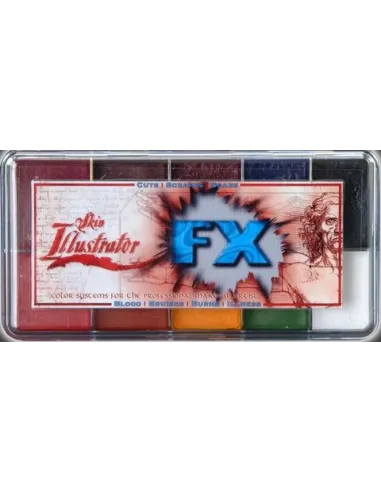
The Skin Illustrator FX Palette is an alcohol-activated makeup palette designed specifically for trauma and skin pathology special effects. Its 10 highly pigmented colours allow you to recreate burns, bruises, cuts, scabs and skin diseases with a realism that is hard to match, and it is compatible with natural skin, silicone and latex.
Technical specifications
| Product type | Alcohol makeup palette (alcohol-activated) |
|---|
| Number of colours | 10 |
|---|
| Colours included | Blood Tone, Aged Blood, Bruise Tone, Ultra Blue, Black, Primary Red, Burn Orange, Primary Yellow, Green, White |
|---|
| Compatible surfaces | Natural skin, silicone, latex |
|---|
| Recommended activator | Skin Illustrator Activator or Skin Illustrator Slow Activator |
|---|
| Alternative activator | isopropyl alcohol 99% (IPA) |
|---|
| Removal | Telesis Super Solv |
|---|
| Main use | Trauma, injury and skin pathology special effects |
|---|
What it is used for
The FX Palette is aimed at special effects makeup artists, film and television professionals, theatre and medical or forensic character makeup. Its colour range is designed to convincingly reproduce the visual appearance of skin injuries and alterations, both on set and in live performances.
- Simulation of first, second and third degree burns
- Recreation of bruises at different stages of evolution (fresh, aged, resolving)
- Cuts, scrapes and abrasions with a realistic appearance
- Scabs and infected wounds
- Skin disease effects: cyanosis, jaundice, necrosis
- Integration of silicone and latex prosthetics with surrounding skin
- Zombie, cadaveric or post-mortem character makeup
- Work on silicone pieces painted before or after application
How to use it
- Make sure the surface is clean, free of oils and dry. On natural skin, apply a base or primer if necessary to improve adhesion.
- Moisten the application brush or sponge with isopropyl alcohol 99%, with the Skin Illustrator Activator or with the Slow Activator (the latter gives more working time).
- Touch the desired colour in the palette with the wet brush. The amount of activator controls the intensity: more activator gives more transparency; less gives greater opacity.
- Apply the colour to the surface with short strokes, blending the edges for a natural transition. Allow to dry briefly between layers.
- Layer colours to create depth. For example, combine Bruise Tone with Ultra Blue and Primary Yellow to simulate a bruise at different stages.
- For burn effects, use Burn Orange and Primary Red on the active areas, and add Black for charred areas.
- Once the effect is complete, seal with a suitable product if the piece will be exposed to perspiration or heavy handling.
- To remove the makeup, use Telesis Super Solv with a gauze or cotton pad. Do not use water, acetone, MEK or 70° alcohol.
Usage tips
Combine the FX Palette with the Flesh Palette for greater realism
The FX Palette is designed to work together with the Skin Illustrator Flesh Tone Palette. The base skin tones in the latter allow injuries to be integrated with the natural skin tone of the actor or prosthetic, making the edges of the wound blend credibly. Apply the skin base first and build the trauma effect on top.
Control intensity with the amount of activator
The level of dilution with activator or isopropyl alcohol 99% determines whether the colour behaves as a transparent glaze or as an opaque pigment. For close-ups and more subtle effects, work in thin, transparent layers. For areas requiring heavy coverage (dark scabs, deep burns), load the brush with less activator. Never use 70° alcohol, acetone, MEK or water: they alter the formula and ruin adhesion.
On silicone and latex: surface preparation
When working on silicone prosthetics or latex pieces, make sure the surface is completely free of release agent or talc residue. A quick pass with a cotton swab moistened with isopropyl alcohol 99% cleans the surface without damaging it. The FX Palette adheres well to intrinsically coloured silicone, but it is always advisable to apply a very light first coat as a sealant before building the final effect.
Frequently asked questions
What activates these colours?
The colours in the Skin Illustrator FX Palette are activated with the Skin Illustrator Activator, the Slow Activator (recommended when you need more working time) or with isopropyl alcohol 99%. The alcohol must be 99% grade: 70° alcohol contains too much water and does not activate the formula correctly, affecting adhesion and drying.
Can these colours be used directly on skin?
Yes. The Skin Illustrator FX Palette is formulated for direct use on human skin. It is a range used professionally in film and television for this purpose. Even so, as with any makeup product, a patch test is recommended on a small area if the actor has sensitive skin.
Does it work on silicone and latex?
Yes, it is compatible with both surfaces. Make sure the prosthetic or piece is clean and residue-free before painting. isopropyl alcohol 99% works both to activate the colour and to clean the surface beforehand.
How is this type of makeup removed?
The recommended method is Telesis Super Solv, which removes the formula effectively without irritating the skin or damaging prosthetics. Do not use water, acetone, MEK or 70° alcohol for removal: they can leave residue or cause irritation.
What is the difference between this palette and the Flesh Tone Palette?
The Skin Illustrator Flesh Tone Palette is aimed at recreating natural skin tones and blending between the prosthetic and the actor's tone. The FX Palette, on the other hand, contains the saturated colours typical of injuries and pathologies: blood reds, bruise purples, burn orange, black, green and white. Both palettes are designed to be used in a complementary way.
Does it hold up to sweat and movement during filming?
Once activated and dry, alcohol-activated makeup has notably superior resistance to water and sweat compared to conventional makeups. The high pigment content of the Skin Illustrator range contributes to longer-lasting colour and better resistance. For long shoots or high physical activity, sealing with a suitable fixative is recommended.
Can I mix the colours together?
Yes. The colours in the FX Palette are fully miscible with each other and with all other palettes in the Skin Illustrator range. You can mix them directly on the back of your hand, on an auxiliary palette or by layering on the working surface.
Which palette best complements the FX for zombie or cadaveric effects?