Shopping Cart



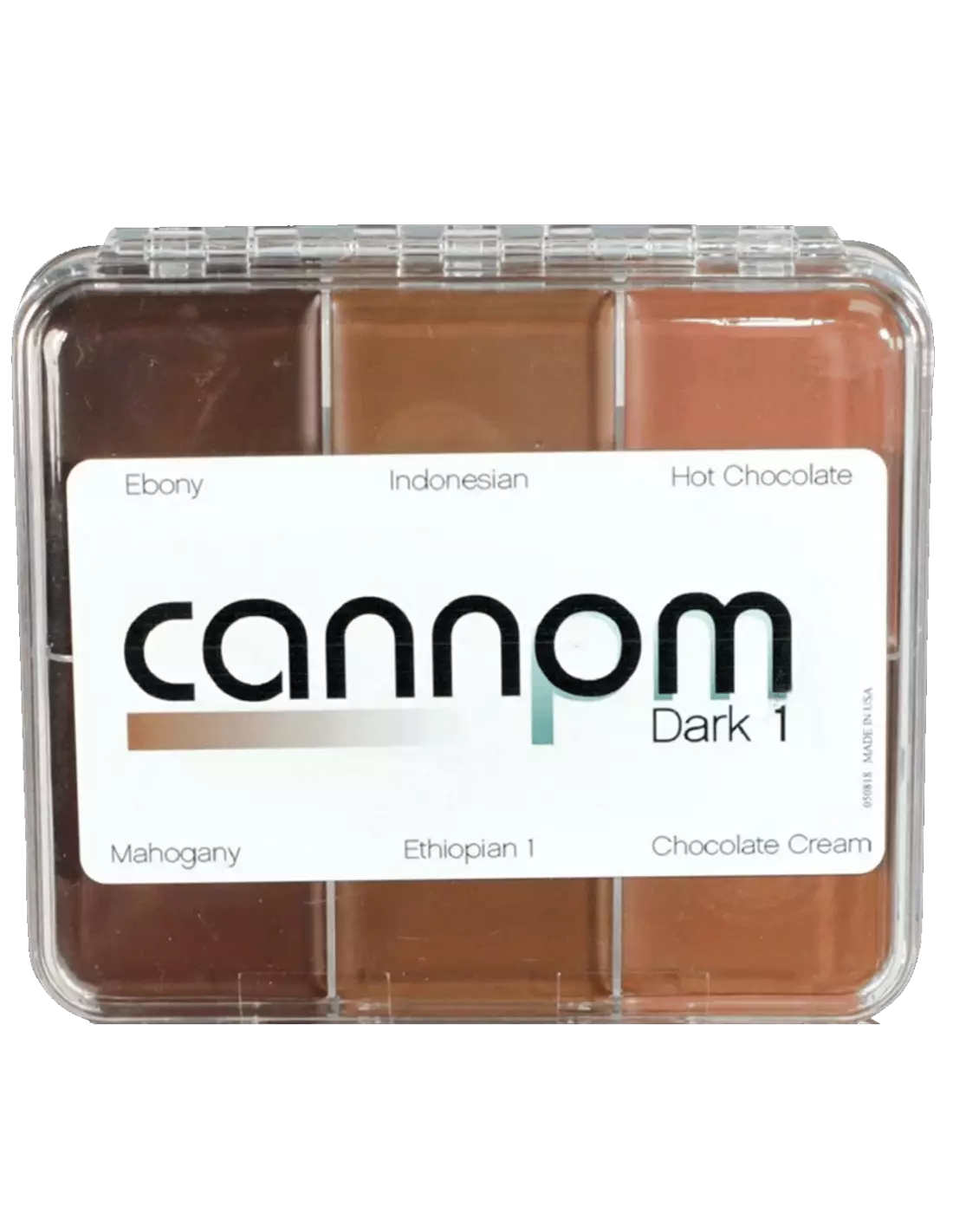
Skin Illustrator On Set Greg Cannom - Dark 1
270030090
€59.00
71,39 € Tax incl.
71,39 € Tax incl.
Skin Illustrator On Set Greg Cannom Dark 1 palette — 6 dark oil-based colors for skin, silicone and latex. Professional film-grade formula.
The Skin Illustrator On Set Greg Cannom Dark 1 palette is a collection of six highly pigmented oil-based colors developed from William Tuttle's original cream and wax formulas. Designed alongside four-time Oscar winner Greg Cannom, this palette brings together the dark shades that have defined some of the most iconic characters in modern cinema. Compatible with natural skin, silicone prosthetics and latex, it is an essential tool for any professional special effects makeup artist.
Technical specifications
| Feature | Detail |
|---|---|
| Product type | Oil-based makeup palette (cream/wax) |
| Number of colors | 6 |
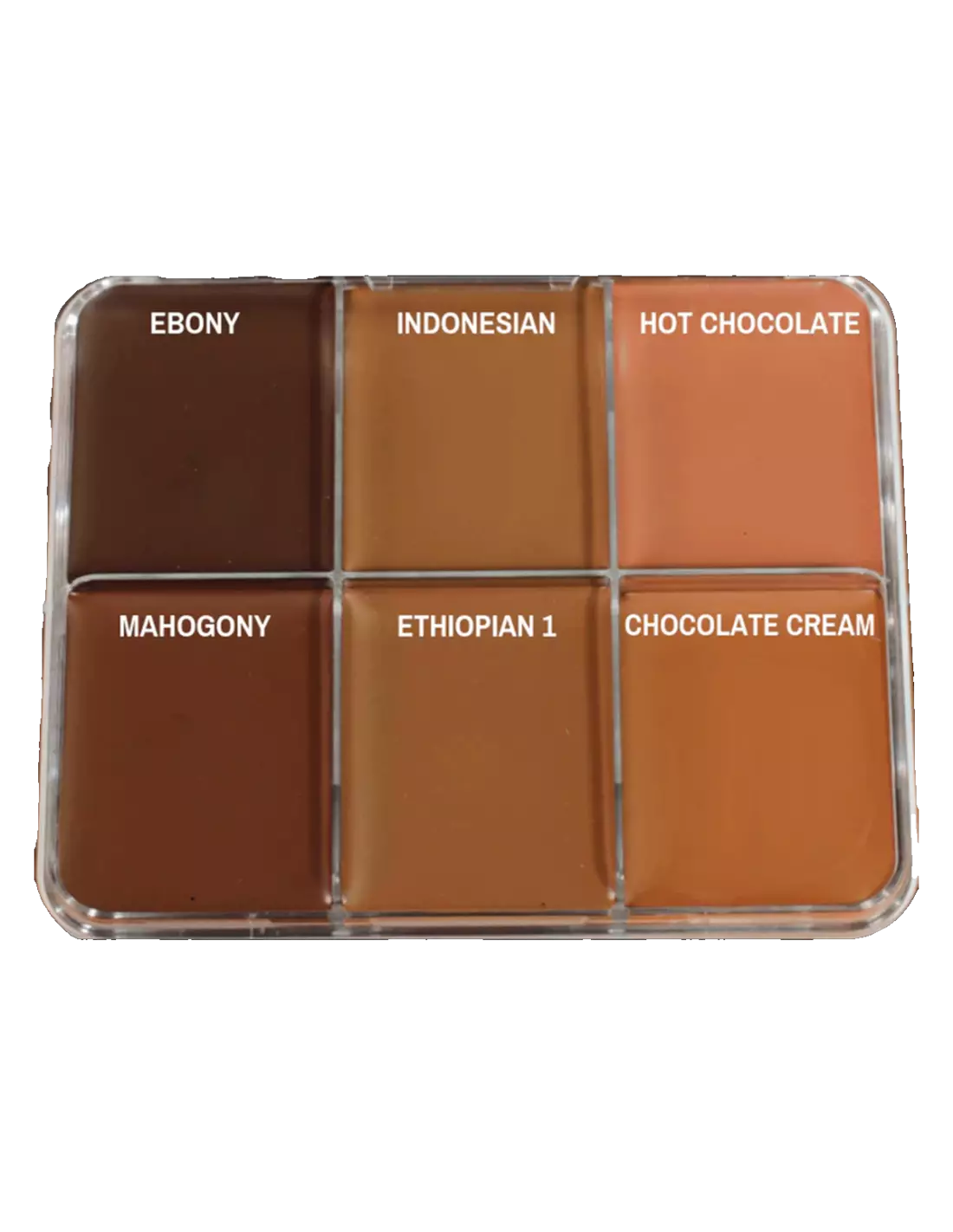
| Colors included | Ebony, Indonesian, Hot Chocolate, Mahogany, Ethiopian 1, Chocolate Cream |
| Collection | On Set Signature — Greg Cannom |
| Compatible surfaces | Skin, silicone, latex |
| Application method | Brush, sponge, applicator |
| Setting | Compatible with HD Matting setting sprays |
| Recommended use | Film, television, special effects, theatre and professional character makeup |
What it is used for
This palette is designed for professionals working with special effects makeup and character design in high-end productions. The six dark shades allow you to create color masks, shading, aging effects, gradients and characters with dark or deep skin tones, both on natural skin and on prosthetics.
- Character makeup with dark skin tones for film and television
- Painting and makeup on silicone prosthetics and latex pieces
- Creating shadows, contours and depth effects in special effects
- Aging and gradients on skin and prosthetic materials
- Color correction and adjustment in complex character makeups
- Blending with other shades from the Skin Illustrator range to expand the color palette
- Theatre productions and professional artistic makeup photography
How to use it
- Prepare the surface: make sure the skin or prosthetic is clean, dry and free of grease.
- Pick up a small amount of color with a flat brush or makeup sponge.
- Apply the color directly onto the desired area using gentle circular motions or thin overlapping layers.
- Blend the shades on the palette or directly on the surface to achieve the desired color. You can combine them with other complexion palettes or flesh tones for more natural transitions.
- Build up color intensity by applying successive layers until you achieve the desired coverage.
- Once application is complete, set the makeup with an HD Matting setting spray to ensure durability and prevent smudging during filming or performance.
- Remove the makeup with a suitable oil-based makeup remover or solvent when finished.
Tips and tricks
Temperature and consistency
Oil-based makeups can harden in cold environments. If the palette feels too firm, gently warm the surface with your fingertip or bring the palette close to a mild heat source before picking up color. On outdoor shoots in hot weather, work in thin layers to prevent running.
Color blending and customization
One of the key strengths of the Skin Illustrator range is cross-palette compatibility. Don't hesitate to mix the dark shades from this Dark 1 with those from the Complexion Palette or the FX Palette to achieve realistic color transitions or more complex skin texture effects. Mix directly on the skin or on a clean plastic tile.
Setting and durability
To ensure the makeup holds through long shooting days without touch-ups, always set with a compatible HD matte spray. Apply the setting spray from a distance of 20–30 cm in gentle sweeping motions and allow it to dry completely before continuing with the character makeup process. Avoid touching the area until the setting spray has fully dried.
Frequently asked questions
Can this palette be used directly on silicone prosthetics?
Yes. Skin Illustrator Dark 1 is formulated to adhere to both natural skin and silicone or latex prosthetics. For best results on silicone, make sure the surface is clean and apply color in thin layers. Setting afterwards with HD Matting spray improves durability on these materials.
Can these colors be mixed with other palettes from the same range?
Absolutely. All products in the Skin Illustrator line are compatible with each other. You can combine the dark shades from this palette with the Flesh Tone Palette, the Complexion Palette or the FX Palette to expand your tonal range and achieve more natural transitions.
How do you set oil-based makeup so it lasts through a shoot?
Oil-based makeups require a specific setting product. The Skin Illustrator range recommends the use of compatible HD Matting sprays, which seal the color without altering its tone and provide a natural matte finish. Apply the setting spray in thin layers and allow to dry between each coat.
What tools work best for applying this type of makeup?
You can apply Skin Illustrator Dark 1 with a flat synthetic fiber brush, a latex sponge or a cellulose sponge. For large areas and base color coverage, a sponge allows for quick, even application. A brush is more precise for details, prosthetic edges and transition areas.
Is it suitable for sensitive skin or prolonged wear?
The Skin Illustrator formula is developed for professional use in film and television, where makeup is worn for long periods. However, as with any oil-based makeup, a patch test on a small area is recommended before applying to larger areas, especially on reactive skin types.
How is this makeup removed at the end of the day?
As an oil-based makeup, it is effectively removed with cleansing oils, cleansing balms or dedicated oil-based makeup removers. Apply the remover to the area, leave it for a few seconds and remove with a gauze pad or soft cotton. Follow up with a gentle cleanser suitable for the skin type.
What is the difference between this palette and others in the same line?
The Dark 1 was specifically curated by Greg Cannom with six dark shades (Ebony, Indonesian, Hot Chocolate, Mahogany, Ethiopian 1 and Chocolate Cream) for character makeups based on deep skin tones or for creating depth and shadows in special effects. Other palettes in the range, such as the Flesh Tone or the Complexion, focus on lighter shades or complexion correction.
Can it be applied over an existing makeup base?
Yes, Skin Illustrator Dark 1 can be applied over existing oil-based makeup foundations. If the base is a different type (fluid, mineral, etc.), make sure it is fully dry and set before applying the color, so adhesion is correct and the makeup does not move.
No reviews
Tap to zoom