Shopping Cart


Scalpel for 3D -set of 3 with 13 blades-
615022023
€10.00
12,10 € Tax incl.
12,10 € Tax incl.
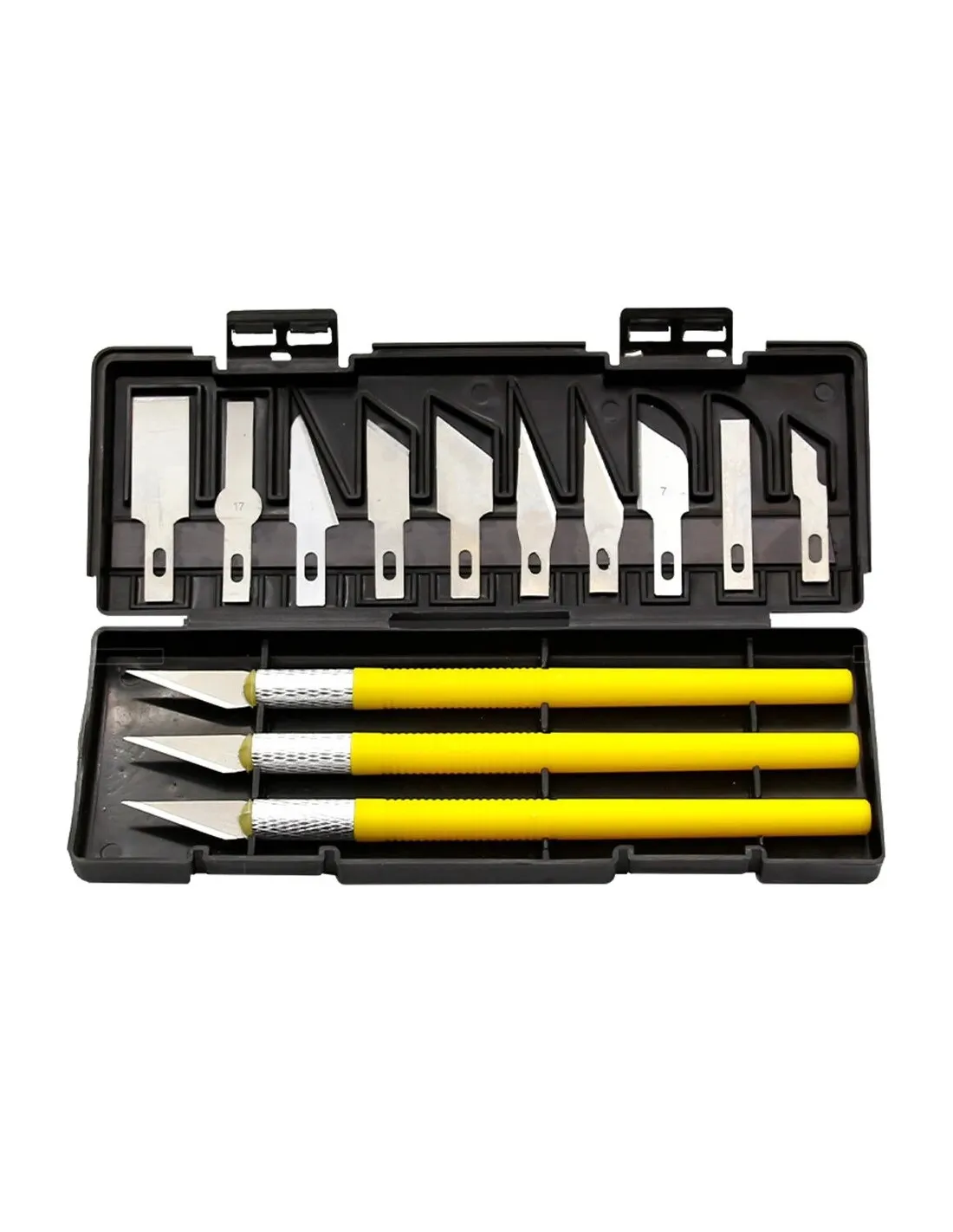
Set of 3 scalpel handles with 13 interchangeable blades and case. Ideal for removing supports and finishing 3D prints.
Precision set for cutting and finishing work in 3D printing and scale modelling. Includes 3 blade handles with 13 interchangeable blades in different geometries, all stored in a compact rigid case. If you work with FDM or resin printed parts and need to remove supports, clean up flash or make fine adjustments, this set gives you the right tool for every task.
Technical specifications
| Set contents | 3 handles + 13 interchangeable blades |
|---|---|
| Handle material | High-resistance plastic |
| Blade types | Multiple geometries (general cutting, angle, carving, stripping) |
| Storage | Case included |
| Main application | 3D print finishing, scale modelling, crafts |
What it's used for
This set is designed for anyone working with 3D prints, prototyping, scale models or precision crafts. The different blades let you tackle very different tasks without changing your main tool:
- Remove supports from FDM and resin prints
- Eliminate flash and layer lines on printed parts
- Trim and adjust edges on cardboard, plastic and acetate
- Cut film, paper and fabrics in craft projects
- Carve and pare specific areas on scale modelling parts
- Prepare surfaces before sanding or painting
- Open casting gates and channels in silicone or resin moulds
How to use it
- Open the case and select the appropriate blade for the type of cut you need.
- Insert the blade into the corresponding handle until it locks securely in place.
- Hold the handle firmly and apply controlled pressure to the material.
- To remove supports from 3D prints, slide the blade under the base of the support and lever gently.
- To clean up flash, work with the blade at a skimming angle relative to the surface.
- When the blade loses its edge, replace it with another from the set to maintain cutting precision.
- Once the task is done, carefully remove the blade from the handle and store everything in the case.
Usage tips
Choose the blade for the task
Not all blades work equally well for every material. Straight-point blades are most effective for linear cuts in plastic and acetate. Curved or angled blades allow access to hard-to-reach areas on complex parts, such as the gaps between supports and the model. Examine the geometry of each blade before you start and choose the one that best suits the job.
Force control to avoid breakage
With photosensitive resin prints, apply minimal pressure and work in short passes. Cured resin can be brittle and too much leverage can break the part. FDM parts are tougher, but it's equally advisable not to force the blade: several gentle passes are better than a single forceful cut.
Maintenance and safety
Change the blade as soon as you notice the edge has deteriorated; working with a dull blade forces you to apply more pressure and increases the risk of accident. Always use the case to store the set: loose blades are a real hazard in any workshop. If you need to make extended cuts in hard materials such as technical fibres, consider complementing with dedicated scissors.
Frequently asked questions
How many blades does the set include and can they be replaced?
The set includes 13 interchangeable blades in different geometries along with 3 handles. The blades are standard type compatible with precision scalpel handles, so you can replenish or expand the selection when they run out.
What materials is this type of blade suitable for?
This set works well on soft and semi-rigid plastics (such as those from FDM prints), cured resins, cardboard, paper, acetate, plastic film and fabrics. It is not intended for cutting very hard materials such as metals or technical fibres, for which specific tools exist such as carbon and kevlar scissors.
Is it suitable for working with silicone moulds?
Yes. Precision scalpel blades are very useful for opening casting gates, creating air escape channels or splitting two-part moulds. Working with sharp blades guarantees clean cuts that do not damage the silicone.
How do you change a blade safely?
Never remove or insert a blade with your fingers directly on the cutting edge. Use another blade or a rigid object to guide the extraction, or fold a piece of paper around the edge to use as a lever. Always store used blades in the case and never leave them loose on the workbench.
Is it useful for scale modelling and model kits as well as 3D printing?
Absolutely. The variety of blade geometries makes it highly versatile for carving, scraping, trimming and adjusting parts in scale modelling, special effects, crafts or any work requiring high-precision cuts.
Where can I purchase this product in person?
Feroca has two physical stores where you can find this set and the rest of the workshop tools: Feroca Madrid (Calle Españoleto, 11 – 28010 Madrid) and Feroca Fuenlabrada (Sierra Elvira, 22 – 28946 Fuenlabrada). It is also available in the online store.
What is the difference between using a scalpel and scissors for cutting work in the workshop?
The scalpel offers greater control for precise spot cuts, localised carving and access to narrow areas. Scissors, especially curved scissors for silicone or fibreglass scissors, are more efficient for continuous cuts on fabrics, fibre cloths or silicones. Both tools complement each other in a fully equipped workshop.
No reviews
Tap to zoom