
Shopping Cart
- Feroca
- Cosplay
- 0 likes
- 7096 views
- 0 comments
Today we're going to introduce you to 3D-Smoother, a product designed to smooth 3D prints.
Learn how to smooth the surfaces of pieces, figures or sculptures created with 3D printing using 3D-Smoother.
It's a very simple and quick process that will give you a smooth finish.
Don't miss the step-by-step guide from specialist Juan Villa for Feroca.
Materials for smoothing a 3D print
This is an epoxy resin with a high density, specially formulated so it doesn't drip or run too much. Its thickness fills in the gaps needed to smooth the desired surface.
Like any other resin, you can apply materials over it, sand it, or add modelling putties.
In this case the epoxy resin comes in two components along with a measuring cup with the measurements clearly indicated.
It comes in two parts of A to one part of B.
As a recommendation: to make the product last as long as possible, make sure you close the dosing caps tightly. This prevents the product from drying out, as well as preventing moisture from getting in if left open — which would cause it to deteriorate and become unusable.
It's also very important to wipe away any excess resin from the caps with a cloth or paper, as it could dry out and prevent you from opening the cap.
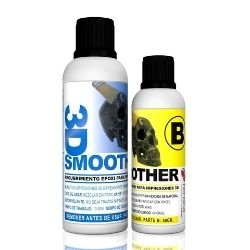
This product delivers excellent results in the world of moulding and model making.
3D Printing
Thanks to 3D printing we can achieve realistic figures and sculptures.
There are currently many ways to print in 3D. However, the most common method is one that uses a type of plastic such as ABS or PLA. This is achieved by heating a filament and, through an extruder, building up our figures layer by layer.
This gives us a very acceptable quality, but the horizontal grooves left by the printing process are still visible. In some cases these marks may be more or less subtle, depending on the quality of the print.
But with this tutorial, what we're looking for is a way to smooth out these grooves without losing any detail — achieving a perfect finish!
Other materials you'll need:
Always read the product instructions first for safety. In this case it's very important to wear gloves to protect your skin, as well as a filter mask to avoid any potential inhalation risks.
You'll also need a small wooden surface to rest the figure on so you can work more comfortably, and a brush to spread the resin mixture over the figure.
Video tutorial for smoothing a 3D print
In the following video we show you the tutorial in which expert Juan Villa demonstrates step by step the smoothing capability of Feroca's 3D-Smoother epoxy resin.
In this case we're going to use a small Terminator animation figure.
Step-by-step guide to smoothing a 3D print
Preparing the mixture
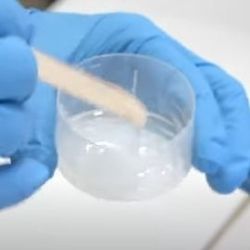
To do this, we're going to use the measuring cup that comes with the product to mix parts A and B of the resin. We need to mix two parts of A with one part of B. You'll see that this is a very economical product and you don't need a large amount.

Next, thoroughly mix both amounts together with a mixing stick to achieve a homogeneous mixture. You'll notice it has a certain density.
Preparing the work surface
To work comfortably, we're going to attach the small figure to a wooden surface using a hot glue gun, and within a few minutes it will be firmly secured.
Applying the product
Next, using a brush, spread the mixture over the surface of the figure.
Try to cover all the grooves and fill them in.
Work in small amounts to prevent the product from running if too much is applied.
The working time is approximately 10 minutes and the full curing time is 4 hours, always depending on the ambient temperature.
You can apply more if you find the layering is still very noticeable once curing is complete

Once it has dried, it will be 100% workable. This means you can sand the figure if you want to remove the shine, for example. We recommend using a fine automotive sandpaper for this.
You can also use 3D-Smoother to achieve a smooth, strong and glossy finish on models made with other materials, such as plasticine, to create the perfect mould for your future reproductions.
Find all your modelling and moulding materials at Feroca
At Feroca you'll find all the materials and tools you need to carry out your moulding and modelling activities like a professional. We offer you products from the best brands and of the highest possible quality.
What's more, if you want to keep learning about this craft and how to use our products, you'll find a wealth of resources where we explain various techniques from industry specialists.
We provide you with video tutorials where we explain everything step by step, you have articles on our blog, as well as WorkShops.
Comments (0)